Autoapp
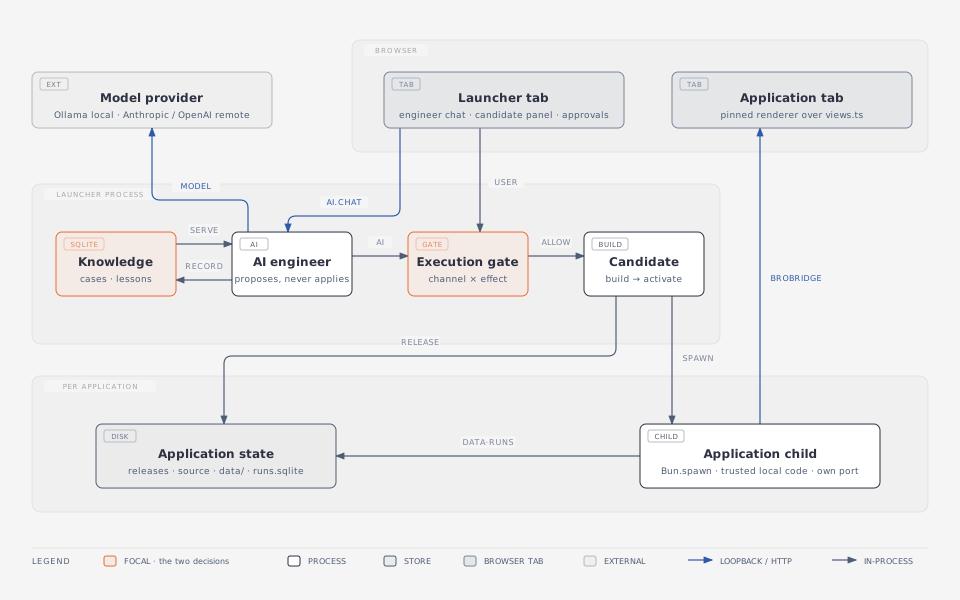
Autoapp is an optional launcher for Broapp applications. It runs each application as its own child process in its own tab; an AI engineer in the launcher's own tab proposes changes as candidate releases; the execution gate stops every change that is not the owner's own click and asks first; and the whole of it ships as one compiled binary per target, with a starter application inside.
Try it
Download the launcher for your machine and run it; no Bun installation is needed. The launcher opens its tab, and New application writes the starter, builds its first release and opens it.
curl -fsSL https://github.com/praveenvijayan/broapp/releases/latest/download/broapp-autoapp-darwin-arm64.tar.gz | tar xz
./broapp-autoapp-darwin-arm64
For a fuller start, the release's notes-starter.zip is the Notes example with its AI panel:
unzip notes-starter.zip
./broapp-autoapp-darwin-arm64 import ./notes-starter --as notes --grant
./broapp-autoapp-darwin-arm64 serve notes
The binaries carry no developer identity (the macOS ones are signed ad hoc, so Apple silicon will start them); the other targets, and what macOS and Windows say about such a binary, are in Packaging and offline.
Stopping it
Closing the launcher's tab stops nothing: the launcher and every application it serves keep running, and its terminal says so. Quit at the foot of the rail, broapp-autoapp stop from any terminal (Windows too) and Ctrl+C are one stop: every application it serves stops, a running backlog task is interrupted without spending its attempt, and the control file goes. broapp-autoapp status says whether a launcher runs over this root and what it serves. A child also stops on its own within seconds of its launcher dying, however it died; children left by a launcher from before this are not found.
Read next
- Design — the seven parts, the gate, and how a candidate release becomes the current one.
- Components — the three layers that draw a page, the one palette that reaches all three, and what anything new has to pass.
- Design guidance — what the engineer is told about deciding a page, what was left out of it on purpose, and the detector that runs over the gallery.
- What the launcher remembers — the record of what the engineer did, and the lessons a resolved case can leave behind.
- The backlog — a request split into tasks written as plans, the tier each task gets, and the panel that shows them.
- Approvals and limits — which calls stop and ask, and how an answer is bound to its question.
- Packaging and offline — the artifacts, where they have been run, and which offline claims have evidence.
- Phase backlog — what phase left out, and what would make each item worth doing.
Autoapp is not containment: a candidate release is trusted local code, crash isolated but not permission isolated. See Scope and limitations.