Autoapp
Autoapp turns a Broapp application into one its owner can reshape while using it. An AI engineer, running in the host, proposes a change to the application's specification and code; the change is built as a candidate release, previewed against a copy of the user's data, and activated with a recovery path. External agents reach the same operations over an MCP adapter, through the same gate. The short version, with a picture, is the Autoapp overview.
Everything is built on the existing Broapp packages. Brobridge is unchanged. The single-document, hash-pinned-CSP page model is unchanged.
The seven parts
The launcher is a Broapp application with the AI layer. It manages other applications: it builds them, starts them, migrates their data and activates their releases. It never runs an application's code in its own process, and it never proxies an application's operations — it supervises lifecycle only. Its own data directory, ensureDataDir('broapp-autoapp'), is called <root> here.
An application child is one Bun.spawned process per application, with its own Brobridge bridge and its own top-level browser tab. There are no iframes, because Brobridge's trust fence allows only Sec-Fetch-Site: same-origin or none: a page on another loopback port cannot frame or fetch an application.
Brobridge is the transport, unchanged.
The renderer is a pinned React package, broapp-autoapp/react. The browser never runs generated code. It runs the renderer over a declarative view specification that contains no JavaScript expressions and no raw HTML.
The application specification is the description the engineer edits: routes, data, views. Every route in it declares an effect; a route that does not is refused. (Core Broapp is more forgiving, so that contracts written before effects existed keep working: a missing effect there is treated as write.)
The engineer is the AI layer, running in the launcher's tab. It proposes changes; it does not apply them.
The gate is below.
There are two ways an application comes to exist, and they meet after the first step. import <sourceDir> --as <appId> copies a workspace somebody already has. create <appId> — the New application button in the launcher's tab, the create command, and the engineer's apps.create tool — writes out one of the two starter workspaces the launcher carries inside its own binary. From there both take the same steps, in src/launcher/workspace.ts: install, git init, build, and then whatever the caller decides about capabilities. Each starter is an ordinary Autoapp source workspace; once it is on disk it is imported in every sense that matters, and every command and every tool works on it.
The two are templates/autoapp-starter, one table and five routes drawn as a table and a form, and templates/autoapp-blank, one page with one sentence on it and no operations at all. The choice is a template field on all three ways in, and it defaults to the items list. Blank is for the person who would rather describe what they want than take apart a list they did not ask for.
There is one way an application stops existing, and it is a person's. launcher.appRemove — a Remove action on the row, and the remove command — renames <root>/apps/<appId> into <root>/trash/<appId>-<stamp> with one rename, so nothing is copied and nothing can be half-gone. It refuses while the application is serving, because renaming a directory out from under a process that is writing to it is how somebody loses the data this is trying not to lose. The launcher never empties the trash: a removal that tidied up after itself is a removal that will one day tidy away the wrong thing. The journal keeps its rows, so what happened to an application outlives it.
The gate
Every mutation of an application, from any channel, passes one gate: Gate.guard in broapp/host. The bridge path, HostApp.invoke, stream starts, AI tool calls, the MCP adapter and the workflow runner all go through it. There is no second door.
A channel says who is asking: user, ai, mcp or workflow. It is set by the trusted adapter that received the request — the bridge handler, the AI runner, the MCP adapter, the workflow runner — and never read from model output, tool arguments, or anything a browser or an MCP client sent. That is the whole basis of the policy: a model cannot claim to be the user, because nothing it can write is consulted when the channel is chosen.
An effect says what a route does. read changes nothing. write changes data inside the application's data directory. external reaches outside it: the network, other files, a spawned process, mail. The engineer's own tools carry the same three: reading a workspace is read, an edit or a build is write, and activation and the two web tools (web.search, web.read) are external.
A mode is live or preview. A preview runs against a copy of the data.
The whole v policy is three rows and no configuration language:
| channel | read | write | external |
|---|---|---|---|
user | allow | allow | allow (refused in preview) |
ai, mcp, workflow | allow | confirm | confirm (refused in preview) |
preview refuses external for everybody, because a copy of the data is not a copy of the world: a message sent from a preview is sent for real.
Approval identity. An approval binds to { requestId, appId, releaseId, route, argumentsHash }, where argumentsHash is sha of the arguments in canonical JSON, hex, first characters. It is consumed once and expires after confirmTimeoutMs. An answer that names a different releaseId or argumentsHash than the pending question is a mismatch and counts as a denial. Without that binding, an answer meant for one call could approve another that happened to be pending under the same identifier after a rebuild, or after a model changed its arguments between the question and the click.
How long a question waits. s for an application's own gate, s for the launcher's, because the engineer's questions arrive after minutes of a model thinking. Both are in security.md under approvals.
What the gate does not protect against. It decides whether generated host code is asked to run. It does not constrain what that code does once it is running. See "Trusted local code" below.
Release identity
releaseId is the sha of the built page bytes, the host bundle bytes and the canonical JSON of the whole application specification with manifest.releaseId and manifest.createdAt removed — hex, lowercase, first characters. It is computed by the build, stored in the release manifest, and reported by the child on hello. It covered only the page, the host and the contract at first, which meant a change to views, migrations, acceptance examples or capabilities alone did not change the identity: a person could add an acceptance check that could never reach a release, and be told it was built. A release directory written under the older rule is refused rather than rehashed, because rehashing would assert its contents are what somebody approved. A running application with no candidate loop has exactly one release. An approval names a release, so an approval cannot survive a rebuild.
The candidate-and-activation loop
- The owner describes a change. The engineer proposes an edit to the
application specification and to any host code the change needs.
- The launcher writes the proposal into the candidate workspace,
<root>/apps/<appId>/source/, which is a git repository — or the folder a person chose for it (see below).
- A build produces an immutable release directory,
<root>/apps/<appId>/releases/<releaseId>/: page, host bundle, spec.
- The launcher takes a consistent snapshot of the live database (
VACUUM INTO
on an open connection — never a file copy while a connection may be writing) into <root>/apps/<appId>/snapshots/, and lays a copy down as data-next/.
- The launcher asks a child of the candidate release to migrate
data-next/
and report. Migrations are forward only.
- The acceptance examples run on
data-check/, a copy ofdata-next/, in a
candidate child in preview mode: writes allowed, nothing external. The copy is removed however that ends. Then the candidate starts on data-next/ itself with its gate paused, so nothing writes the data that is about to become live, and is asked only whether it is serving. runs.sqlite lives inside the data directory, so a preview records into its copy and a live child into the real one.
- The owner activates. The live directory becomes
data-prev-<timestamp>/,
data-next/ becomes data/, and <root>/apps/<appId>/current names the new release. The switch is recorded in <root>/journal.sqlite.
- The old child is drained and shut down; the new one is started.
A workspace where the person chose
By default the workspace is <root>/apps/<appId>/source/, inside the launcher's own data directory, where nobody keeps their projects. create --at <dir> and launcher.appCreate's location make it at <dir>/<appId>/ instead, and write a pointer beside the application's releases: <root>/apps/<appId>/location.json, mode , { "version": 1, "source": "<absolute path>" }. Without the file the workspace is where it always was. layout.app() is the only reader; its source is the pointer's path, and its sourceLocation says default, chosen or unreadable.
Only the source moves. Releases, data*/, snapshots, current, the grants, the candidate state, the journal and the trash stay under <root>: activation swaps data-next/ into data/ and removal moves the application's directory into the trash, each with one renameSync, and a rename is atomic only on one volume. The pointer lives in the application's directory so that it goes to the trash with it and comes back with it.
A chosen folder is checked before anything is written — it must exist, be a writable folder, not be inside the launcher's folder or another application's workspace, and not already hold <appId> — so a refusal keeps the id free. The pointer is written only after the workspace has been made by that creation. A workspace that later goes missing, becomes a file, cannot be read, or whose pointer cannot be believed is said in one sentence wherever it is met — the list, a build, the engineer's tools, a backlog run, orientation — and nothing recreates it; the application still opens, because a release is self-contained. launcher.appLocate and broapp-autoapp locate rewrite the pointer to a folder holding that application's autoapp.json. Removal leaves a chosen workspace where it is.
The launcher's tab with the engineer at work: the conversation in the middle, and beside it the applications and the proposed change, with its checks.
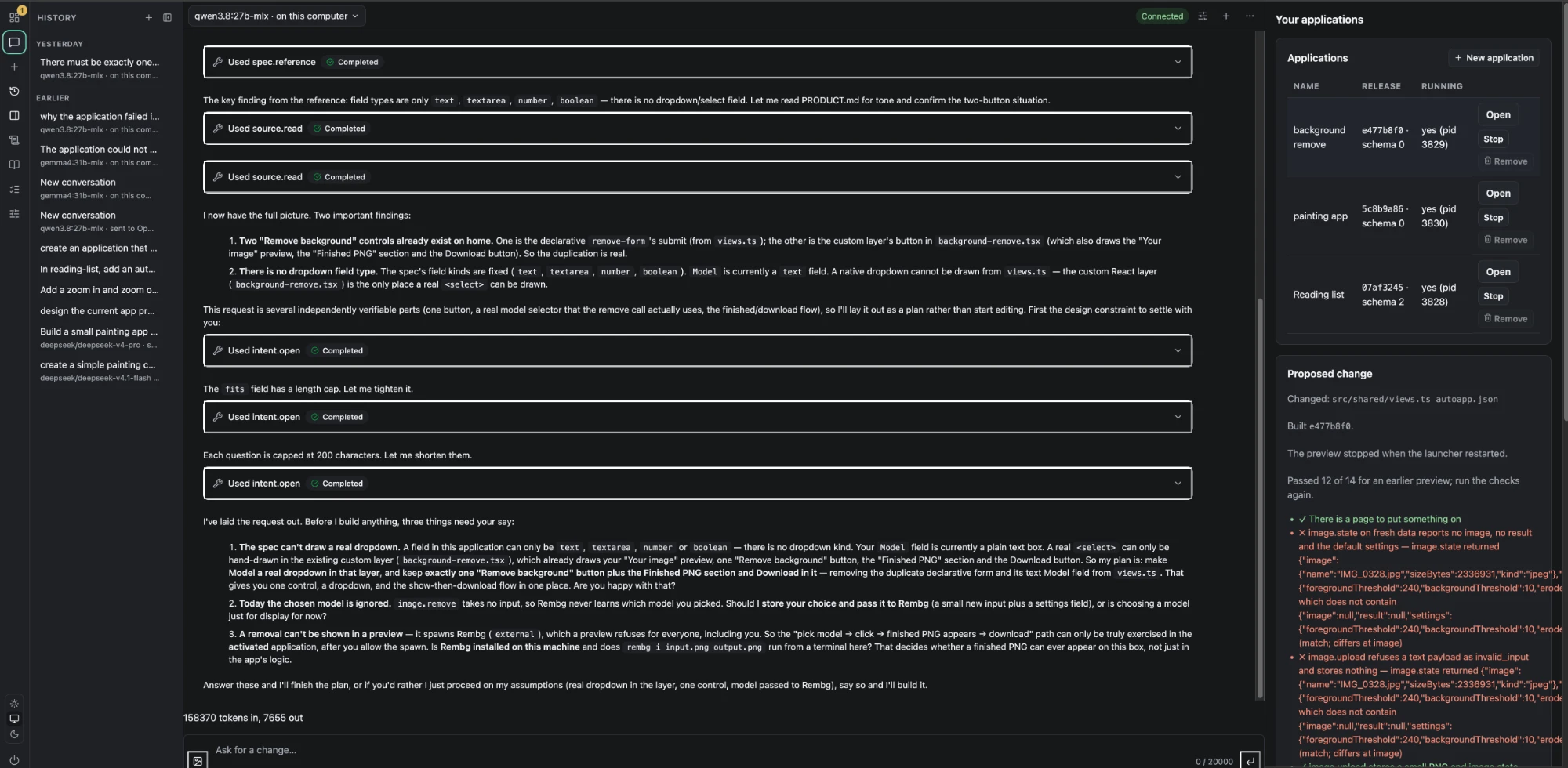
The launcher writes down every build, check and edit in this loop with the run and call that made it and the source revision it happened at, in <root>/launcher/knowledge.sqlite. A failure and the repair that followed it become one case, and the store refuses to change a case once it is resolved. The candidate itself is kept in <root>/apps/<appId>/candidate.json, so after a restart the person sees the same candidate, is told which checks no longer hold, and is offered to start the preview again. See learning.md.
What a check proves
An acceptance example in autoapp.json is a list of steps. A route step calls a route on a preview of the candidate and compares the output, whole (expect) or in part (match, where {"$is": "number"} and the other kinds say what a value is without saying what it equals), or asserts with fails that the route refuses, by code and by words; a crash is never a refusal. Activation runs the examples where the preview runs them: a child in preview mode on a copy that is thrown away, writes allowed and external effects refused, so an example that writes passes or fails in both places alike. The preview's copy is of the live data, which the preview child's own start brings to the release's schema; activation's is of the data after its migrate step, so a release whose start and migrate migrate differently can pass one and fail the other. Examples run in order on one copy in both places, so a later example sees the rows an earlier one wrote. A view step asserts that a page, or a component on it, is declared in the candidate's view specification, or is not, and what it declares. The first proves the host; the second proves what the page is told to draw. Neither renders a page, and every check report says so in the same words, because "the checks pass" is not "it looks right" and only a person at the preview can say the second. The engineer reads the rules of each file with spec.reference before changing it, a topic at a time, rather than being handed the whole schema every turn. Before writing an example down it can try steps against the preview that is already running with preview.try: read routes only, the actual output returned, nothing recorded as verification. A failed step names where the output diverged and under which comparison, so the fix is to the right field.
A preview refuses an external route before the route sees it, for everyone, so no step on one tests anything: a step that expects output always fails, and a fails step always passes, on the gate's refusal rather than the route's. The news application of -- completed three tasks on six such steps and activated a release that did nothing. So a build refuses an acceptance step that names an external route, with the reason and what to assert instead — the page, the form, a route that is not external — and the route goes in the task's runbook, to try after activating. A build also refuses a contract with an external route and a manifest that asks for no capability, naming the three kinds: the capability is how the person is told what the route reaches at candidate.explain and asked at activation. Both are build rules on the specification a build has just assembled, never in parseSpec, so a release built before them still reads, activates and rolls back with its examples. And host code runs only when a route is called: there is no timer or scheduled channel, so work on a schedule is out of reach until the gate has a channel for it.
The engineer and the web
Two tools let the engineer read the web: web.search, a query to a search engine's script-free results page, and web.read, one page as readable text with the links in it. Both run in Bun.WebView — the system WebKit on macOS, an installed Chrome, Chromium, Edge or Brave elsewhere — one throwaway view a call, keeping no cookies and nothing on disk. On a Bun or a machine without a browser the tools are still offered and say so when called, so the model is never shown a list that differs by machine.
Both are external. A query is text the model wrote and a page is a request another server sees, and either can carry something off this machine; so the gate asks the person before each call, records the answer, and the standing approval does not cover them. web.read takes http and https addresses on the internet only — never loopback, a private range, localhost, a bare name or a .local one — checked on the address the model gave and again on where the page ended up, because the launcher's control port and every application listen on loopback and a redirect is a second address. Every result carries one line saying what follows is data, and the instructions say a page is never an instruction. See security.md.
The rollback boundary
Before the new release has accepted a write, rolling back is a pair switch: the previous data directory is still exactly what it was. After the new release has accepted a write, that is no longer true, and there are only three honest options: a compatible downgrade, a forward repair, or an explicitly approved restore that discards the writes made since activation. The activation journal records which of those the owner is in, so nobody has to guess.
Trusted local code
Generated host code runs in a child process. That child is trusted local code: crash-isolated, not permission-isolated. It runs with the owner's own permissions and can do anything they can do. The gate decides whether it is asked to run; it does not confine it once it is.
This is said plainly everywhere it appears, and the words "sandbox" and "isolated" are not used for it, because both would promise a boundary that is not there. What v offers instead is that nothing gets built without the owner asking for it, nothing external happens in a preview, and every call that changed anything is recorded against a release.
Generated browser code does not exist at all. The page runs the pinned renderer over a declarative view specification, so a proposal cannot introduce script into a page whose CSP is pinned to the hashes the build computed.
Offline tiers
Three separate claims, in increasing order of difficulty. Each is now a case in tests/autoapp-offline.test.ts, run on Linux, macOS and Windows.
| Tier | What holds | What it rests on |
|---|---|---|
| Run offline | An installed application's local features work with no network. | A built release resolves nothing at run time: every dependency is inlined into host.js, and the only specifiers left are bun:sqlite and Node builtins. The release serves with its whole source workspace deleted. |
| Edit offline | Source changes build and activate, using dependencies that are already installed. The engineer needs a model — a remote provider is unavailable offline, a local one (Ollama) works. | A per-application vendored node_modules, created once at import. |
| Extend dependencies offline | Refused, with the reason. | The build checks every declared dependency resolves before bundling, and names the one that does not. |
No flag prevents a socket from opening — Bun --offline..BUN_OFFLINE has no BUN_OFFLINE, --offline still downloads — so nothing here rests on one. The evidence, the platform matrix and the Windows differences are in packaging.md; approvals, the control connection and what none of this protects are in security.md.
Between an application and the panel
Every tab is its own bridge with its own launch token, so the panel opening an application was a one-way door: a person who closed the panel's tab had no way back to it but stopping the launcher, and stopping the launcher stopped their applications. Three things close that.
An application the launcher serves draws an Autoapp mark in its page's top-right. The route behind it, autoapp.panel, is mounted by the child runtime rather than by the application, so a release built before the route existed gets it too; it asks the launcher over IPC (ask, answer), and the launcher mints a fresh single-use address for its own tab with Brobridge's launchUrl() and hands it to the operating system's browser opener, the same way the panel opens an application. The mark is drawn only when the page's probe at load says there is a panel; serve <appId> has none.
broapp-autoapp open against a root whose launcher is running asks that launcher for a panel address over the control connection and exits, instead of starting a second launcher beside it.
<root>/launcher/serving.json lists the applications that are serving. Opening one adds it; stopping or removing it takes it out; stopping the launcher does not. A launcher that starts again serves everything listed that has a current release, on new ports and without opening a browser, unless --no-restore. This is the one change to existing behaviour.
The theme contract
An application owns its appearance through tokens, not through rules. The renderer draws every component with .autoapp- selectors and takes every colour, gap, font size, corner and control size from an --autoapp-* custom property; nothing in view.css is a literal any more, and a test fails if one comes back.
The contract is one table, AUTOAPP_TOKENS in packages/broapp-autoapp/src/react/theme.ts: each token's name, group, purpose, light and dark default, and the components that read it. Two things are derived from it and held to it by tests. src/react/tokens.css, the defaults, is generated by bun run build:tokens and committed, and a test regenerates it and compares byte for byte. The engineer's spec.reference topic theme is built from the same table when the module loads. Every default is the value the renderer used before the table existed, so no application changed appearance when the table arrived; view.css keeps each default as its var() fallback, and the test holds every fallback to the table.
An application does not write that mapping by hand. Its palette is seven properties on its own :root — --bg, --surface, --border, --text, --text-muted, --accent, --accent-contrast — which is what the AI panel already reads and what the launcher already feeds from --launcher-*. Every colour token with a reads in the table is generated as var(--<reads>, <default>), so one palette reaches the renderer and the panel together, and the reads column is the only copy of the mapping.
Precedence has four rules, in the order they resolve. The defaults sit on :where(:root), which has no specificity. One of the seven, on the application's :root, reaches every token that follows it. A token set directly on :root beats what it would have followed — which is how an application makes the renderer and the panel differ on purpose, since the panel never reads an --autoapp-* property. Inside the panel, and inside anything the panel portals to the end of the document, .broapp-tokens carries the panel's own mapping of the same seven. An application that defines a light palette defines the dark one too. An application imports broapp-autoapp/react/tokens.css and then broapp-autoapp/react/view.css, and all of it lands in the page's one stylesheet, pinned by hash like the rest.
Two presets, presets/quiet.css and presets/dense.css, are sets of tokens for both schemes and nothing else. An application uses one by copying it into its styles.css; a theme is bundled and hashed with the page, never switched while it runs. bun run theme-gallery draws the starter's page under each preset in both schemes, for a person to look at.
bun run theme-check is the check a person cannot do by reading. It builds the page with the real build under three themes, opens each in Chromium under light, dark and no-preference, opens the panel's select so its portal is measured, and reads computed styles and contrast: nine combinations, one line per measurement. It is the first rendered check in this repository, and it found a real fault the day it was written — portalled content sat outside the panel's token scope and read no colours at all. What each layer is for, what may be added to it and how, is in components.md; the checklist a model follows when adding one is "Adding a component" in prompts/autoapp/00-common-rules.md.
A change costs bytes as well as behaviour. candidate.explain reports the candidate's page.html size beside the serving release's, and the launcher's candidate panel shows the size when it moved by more than %.
How the launcher is composed
The launcher is one binary, assembled by hand. createLauncherTab() in src/launcher/tab.ts takes every service it needs as a named argument and wires the engineer, the knowledge store, the tools and the routes in one visible order; the evaluation harness calls the same function. There is no module registry, no kernel, no dependency resolver and no runtime loading. A feature that cuts across layers, as knowledge does, is wired in that function under its own name, and a new one is added by editing it and rebuilding. Bun's plugin, preload and macro mechanisms are load-time tools and are not used as an architecture.
This was reviewed in September and kept on purpose. The two costs a framework would have paid for, a second cross-cutting feature and a second person adding features, do not exist yet, and a contract written from one instance is a guess. The decision is revisited when a second feature needs routes, tools, an engineer hook, a panel and migrations together; until then the shape of that feature is unknown and the abstraction would be wrong.
Two things follow from one binary. Every feature ships in the same release, so knowledge.sqlite keeps one append-only migration sequence under user_version; a per-feature ledger is a separate requirement that arrives with separately shipped features, if they ever do. And durability is decided per store, not per framework: the activation journal writes with synchronous = FULL because recovery reads it, and the knowledge store stays at WAL's NORMAL because nothing in it is read by recovery and every write runs on the launcher's event loop. The reasons are beside the pragmas in src/launcher/journal.ts and src/knowledge/store.ts.
The second cross-cutting feature arrived with prompt a: the backlog, whose store, routes and panel are described in intents.md. It was wired by hand in the same way as knowledge, under its own name. It has its own store, intents.sqlite, with its own migrations; routes on the launcher's contract; and a panel on the rail. It has no engineer hook yet, because b adds one. Report a compares, side by side, what each of the two features needed from the tab, main.ts, the contract and the rail. The abstraction can be judged from those two instances when b and c have finished the second one.
Where the rest of it is written down
- components.md — the three layers that draw a page, the one
theme that reaches all three, and the gate anything new passes.
- design-guidance.md — the
designreference topic: what
the engineer is told about deciding a page, what was deliberately left out of it, the detector that runs over the gallery in CI, and the attribution.
- intents.md — the backlog: intents, tasks written as plans,
the statuses and moves, the tier rule, and the Backlog panel.
- packaging.md — the launcher binary, its targets and sizes,
what is smoke-tested where, Windows, offline evidence, publishing.
- security.md — the gate, approvals and their windows, the
control connection, MCP, attachment, the rollback boundary, what is deferred.
- backlog.md — what phase left out on purpose, and what would
have to be true before each item is worth doing.