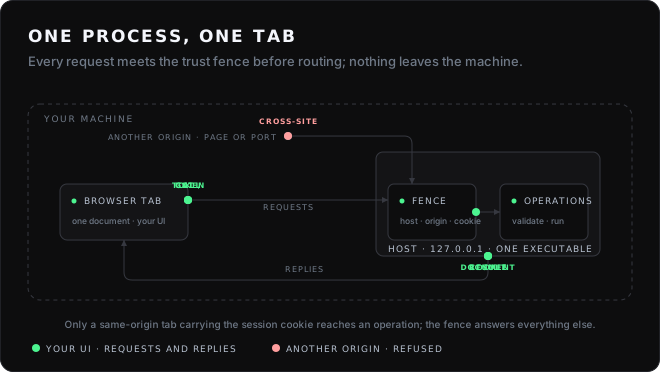
The security-sensitive parts — the trust fence, the one-time launch token, the session cookie, the framing, resume — are Brobridge, used unchanged.
Download the launcher
Every release ships the Autoapp launcher as one compiled binary per target, broapp-autoapp-<target>. No Bun installation is needed on the machine that runs it; the launcher carries a starter application inside it.
curl -fsSL https://github.com/praveenvijayan/broapp/releases/latest/download/broapp-autoapp-darwin-arm64.tar.gz | tar xz
./broapp-autoapp-darwin-arm64
Download it from a terminal, as above, and macOS runs it. Download it with a browser and macOS tags the file as quarantined; because the binary is not signed with an Apple developer identity, Gatekeeper then reports it as "damaged" and offers only the bin. It is not damaged. Remove the tag and it runs:
xattr -d com.apple.quarantine broapp-autoapp-darwin-arm64
Killed on start, with no other output? Launchers up to .. carry a signature that does not verify, and macOS on Apple silicon stops such a binary before it runs. Later releases are signed ad hoc on a Mac. For an older one, sign it yourself:
codesign --force --sign - broapp-autoapp-darwin-arm64
Windows shows SmartScreen's "protected your PC" for the same reason; choose More info, then Run anyway. Signing and notarisation are the fix, and they are in the backlog.
The launcher opens its own tab. Press New application, give it a name, and it writes the starter to disk, installs its dependencies from npm — the one time the launcher reaches the network — builds the first release, makes it current and opens it. From then on the engineer in the launcher's tab proposes changes as candidate releases; create <appId> does the same from a terminal.
The release also ships notes-starter.zip, the Notes example with its AI panel and its dependencies pointed at the published packages, for a fuller starting point:
unzip notes-starter.zip
./broapp-autoapp-darwin-arm64 import ./notes-starter --as notes --grant
./broapp-autoapp-darwin-arm64 serve notes
The binaries carry no developer identity; on macOS remove the quarantine attribute first (xattr -d com.apple.quarantine <binary>), and see docs/packaging.md for Windows.
What is in here
The examples are generated by the same generator a user runs, and use only the same published tooling. That is deliberate: an example built by hand stops testing whether the tooling is enough.
How an application is shaped
src/shared/contract.ts    What the UI may ask the host to do. Both sides import it.
src/host/                 The implementations, and startup.
src/host/ai.ts            Optional: which providers, what the model may read and do.
src/ui/                   React components and the browser entry point.
The contract is the only thing the two sides share. It holds schemas, not code, so the browser bundle can follow it without dragging the host in — and the build fails if browser code ever imports from src/host.
Adding an operation is three steps: declare it, implement it, call it. The host refuses to start if a declared route has no implementation, so a half-finished operation fails at startup rather than under a user's click.
// src/shared/contract.ts
'notes.rename': {
  input: s.object({ id: s.number({ int: true }), title: s.string({ min: 1, max: 200 }) }),
  output: s.object({ ok: s.boolean() }),
},

// src/host/operations.ts
app.operation('notes.rename', ({ id, title }) => ({ ok: store.rename(id, title) }));

// src/ui/SomeComponent.tsx
const rename = useOperation<AppContract, 'notes.rename'>('notes.rename');
What it does not do
- It is not a security audit. Brobridge's threat model is documented and
Broapp preserves its defaults; neither has been independently audited, and this project does not claim otherwise.
- It does not make small binaries. A compiled application is around MB,
because it contains the Bun runtime, plus about MB if it turns on the AI layer. See packaging.
- It has no hot module replacement. Achieving it would mean serving the
application from an unauthenticated origin. broapp dev rebuilds and restarts instead, and says why.
- It does not cross-compile your native dependencies.
bun build --compile
produces a binary for another platform; it does not run it. Broapp's tooling and CI keep "built" and "smoke-tested" separate.
Documentation
Browsable at <https://praveenvijayan.github.io/broapp/>, generated from the files below so the two cannot drift.
Using Broapp from an AI agent
The repository ships an Agent Skill in skills/broapp: the workflow, the rules, and the reference material an agent needs to scaffold, extend, verify and ship a Broapp application. It follows the open SKILL.md format, so it installs into Claude Code, Codex, Cursor, Cline, Copilot, OpenCode and the other agents the skills CLI supports:
npx skills add praveenvijayan/broapp
The skill is plain Markdown plus one shell script. Read it before trusting it, as with anything an agent will follow.
Requirements
Bun . or newer. Verified on Bun ... No other runtime is required, at development time or afterwards.
Status
Version broapp build.127.0.0.1.listed earlier: the macOS launcher starts on macOS broapp-autoapp. Bun broapp.127.0.0.1.broapp build leaves every macOS binary with a signature that does not verify, and macOS broapp-autoapp on Apple silicon kills such a binary before it prints anything; the broapp build.127.0.0.1.broapp-autoapp launcher was also built on Linux and never run on a Mac. broapp build and the launcher's build now sign a macOS binary ad hoc on a Mac and check it, the release builds both macOS launchers on macOS, and the Apple silicon one smoke-tested is the one shipped. Alerts moved from the Overview header into Settings, as two switches. broapp broapp build.127.0.0.1.broapp-autoapp (signForMacos, additive), broapp-autoapp broapp build.broapp-autoapp.broapp-autoapp. Before it, broapp build.127.0.0.1.broapp-autoapp: a reloaded tab is served. Every broapp server on 127.0.0.1 set a session cookie of the same name, and a browser keeps one per host with no regard for the port, so opening an application took the launcher's tab its session, and reloading either showed "Access to .broapp build.broapp build.broapp was denied". Brobridge broapp build.signForMacos.broapp-autoapp names the cookie for the server's port, so each keeps its own. A tab opened before the upgrade needs one fresh Open. broapp broapp build.127.0.0.1.broapp-autoapp, broapp-autoapp broapp build.broapp-autoapp.locate <appId> <dir>. Before it, broapp build.127.0.0.1.locate <appId> <dir>: a check that cannot fail is refused, and an external route names what it reaches. A build refuses an acceptance step on an external route, which a preview refuses before the route runs, so such a step passed on the preview's own refusal and asserted nothing; it also refuses an external route in a manifest that asks for no capability, so the person is told and asked at activation. A plan refuses a criterion only the activated application could show, and the engineer is told host code runs only when a route is called. Work without asking now covers the engineer's web search and page reads too. Releases built before keep their examples and still activate. broapp-autoapp broapp build.broapp-autoapp.create --at <dir>. Before it, broapp build.127.0.0.1.create --at <dir>: every Open of an application gets a launch address of its own. The second Open used to go to the bare origin and ride on the session cookie the first had minted; but the panel, a preview and every application on this host set a cookie of the same name, and a browser keeps one per host with no regard for the port, so whichever bootstrapped last owned it and any other tab reopened that way was refused. Now the launcher asks the child for a fresh single-use address on every click. broapp-autoapp broapp build.broapp-autoapp.<folder>/<id>. Before it, broapp build.127.0.0.1.<folder>/<id>: a page cannot pass an input to an operation that takes none, and an old build is not offered as an update. A view source or action with an input on a route declared s.void() is refused at build time, in a sentence that says to leave the input out; an application built before the check keeps working, because the page now sends nothing for an empty input on such a route. A candidate that was activated once and no longer serves is never "ready to activate": the panel says activating it again is a rollback. The engineer can also search the web and read a page, each call approved first. broapp-autoapp broapp build.broapp-autoapp.broapp-autoapp. Before it, broapp build.127.0.0.1.broapp-autoapp: the prompt bar holds its shape, and so does the applications table. The box starts at the left edge and the image button, the counter and send sit together at the right; each piece is pinned to its cell, so nothing pushes the box aside or wraps the controls under the button. In the applications table, Open, Stop and Remove sit side by side on a line of their own under the row, above its workspace path, instead of stacking in a squeezed cell. broapp-ai-elements broapp build.127.0.0.1.broapp-autoapp and broapp-autoapp broapp build.broapp-autoapp.broapp-autoapp. Before it, broapp build.127.0.0.1.broapp-autoapp: work without asking. The engineer's edits, builds and previews can be approved once for every application — Allow, and stop asking on an approval card, Work without asking in Settings, or broapp-autoapp standing on — while activation, creating or removing an application and anything that reaches outside still ask; the gate still records every answer and the launcher's log says which the switch gave. The Overview now leads with the applications. broapp broapp build.127.0.0.1.external (an optional standIn on createAi), broapp-ai-elements broapp build.127.0.0.1.external and broapp-autoapp broapp build.broapp-autoapp.broapp-ai-elements. Before that, broapp build.127.0.0.1.broapp-ai-elements: an icon for each application, and a removed application no longer needs you. Each application has an icon beside its name on the Overview and in the applications table — a glyph for what its name says it is, else its first letter, on a tile whose colour comes from its id; nobody chooses it yet. A failed task of an application that has been removed no longer stays in Needs your attention. Launcher only: broapp-autoapp broapp build.broapp-autoapp.createAi. Before it, broapp build.127.0.0.1.createAi: an application's project where you keep your projects. The New application form has a Where it lives field: left alone, nothing changes; with a folder chosen — from the system's own folder window, or typed — the source workspace is made at <folder>/<id>, and the form says where before Create is pressed. Only the source moves: releases, data and snapshots stay with the launcher. A workspace that later goes missing — renamed, deleted, on a drive that is not connected — is said in one sentence on its row, is never recreated, and never stops the application opening; it comes back by itself when the folder does, or through Locate… when it moved. Removing an application leaves a chosen workspace where it is. From the command line: create --at <dir> and locate <appId> <dir>. A model cannot choose a location. Launcher only: broapp-autoapp broapp build.broapp-autoapp.standIn. Before it, broapp build.127.0.0.1.standIn: a model list that does not wait for its slowest provider. Listing gives each provider five seconds, and no longer. One that does not answer in time gives the list it gave last, marked listed earlier and when, and its models can still be chosen. A provider that answered in the last thirty seconds is not asked again, so three panels opening is one request; Refresh always asks. What is kept is in memory only, and is dropped when the provider's address or key changes or it is turned off. Three packages: broapp broapp build.127.0.0.1.external, additive (ai.modelsRefresh, a reason on a provider under the list); broapp-ai-elements broapp build.127.0.0.1.external, for the picker's heading and line; and broapp-autoapp broapp build.broapp-autoapp.broapp, which depends on both. Before it, broapp build.127.0.0.1.broapp: more than one model source at once. Every provider keeps its own address, model and key, and is either turned on or never contacted. A model written <provider>:<model> runs on that provider from a conversation, a task or a tier, so light work can stay on Ollama while deep work goes to a hosted model, and nothing falls back from one provider to another. Settings holds a section per provider with its own test and switch; the model list is every turned-on provider's, read at once, and one that cannot be reached costs its own group and says why; wherever a model is chosen or named it says on this computer or sent to its provider. OpenRouter has a preset of its own. Four packages: broapp broapp build.127.0.0.1.external, additive; broapp-ai-compatible broapp build.127.0.0.1.signForMacos, for the preset; broapp-ai-elements broapp build.127.0.0.1.external, for the picker; and broapp-autoapp broapp build.broapp-autoapp.broapp-autoapp standing on, which depended on all three. Before it, broapp build.127.0.0.1.broapp-autoapp standing on: Settings is one set of controls. The AI settings panel draws itself whole in any application: one height, corner and border for a field, a select and a button, "Required" or "Saved" beside the label, a saved key shown as its last characters with Replace and Remove, a switch for remembering it, and a full-width connection test. The launcher's Log, Knowledge, Backlog and Settings panels share one header, and the panel's lengths follow the renderer's control tokens, so a preset moves both. The vocabulary is written down in docs/autoapp/components.md for the next component. Two packages: broapp broapp build.127.0.0.1.broapp-autoapp, for the panel and ai.css, and broapp-autoapp broapp build.broapp-autoapp.broapp-autoapp, which depended on it. Before it, broapp build.127.0.0.1.broapp-autoapp: the launcher opens on what needs you. An Overview, the first screen and a view beside the chat, says what is waiting for you, which task is running and at what stage with its limits, what the day has cost as far as it is known, what is left, and what each application is doing, each with the one action that opens where it is decided. Every turn now leaves a usage row, partial when it was cut short; prices are a file you write, and a model without one shows tokens and never a cost. Six events can raise a notification, the ones that need you with a short generated sound, and permission is asked only by a click. A preview that cannot start says why, to the builder and to you, and a plan no longer sends you to try an external route in a preview, which refuses it. Two packages: broapp broapp build.127.0.0.1.broapp, for a running turn's usage and the model a turn ran on, both additive, and broapp-autoapp broapp build.broapp-autoapp.broapp-ai-elements, which depended on it. Before it, broapp build.127.0.0.1.broapp-ai-elements: a completed task means it. An acceptance example can say a value's kind ({"$is": "number"}) and that a route refuses (fails), and activation runs the examples where the preview ran them, on a copy that is thrown away, so an example that writes passes both. A step refuses a key it does not know, naming the one that was meant; a finished task's example is held by what it says, so a later task cannot keep its id and weaken it; the valid input shown to a refused builder is one that would really run; a backlog turn refused four times for the same reason is ended; a turn too long to give back whole gives its newest calls; and the evaluation counts an edit when it lands and tokens only when they are known. Two packages: broapp broapp build.127.0.0.1.127.0.0.1, for a cut-short turn's partial usage and the history expansion, both additive, and broapp-autoapp broapp build.broapp-autoapp.broapp-autoapp, which depended on it. Before it, broapp build.127.0.0.1.broapp-autoapp: a wider Backlog panel, tasks beside the request's analysis, and a task row whose model select stays on its row; one package, broapp-autoapp broapp build.broapp-autoapp.s.void(). Before it, broapp build.127.0.0.1.s.void(): a failed task says why, and the launcher can be stopped. A task whose builds were refused names the tool, the count and the error, to the person, the advice and the next attempt; a turn that ends with unbuilt edits is built once by the host; broapp-autoapp stop and status, a Quit in the panel, and children that exit when their launcher is gone. broapp-ai-anthropic and create-broapp stay at broapp build.127.0.0.1.broapp. Earlier: broapp build.127.0.0.1.input, a backlog. The engineer restates a request, checks it against the application's real routes and pages, and splits it into tasks a person reviews in a Backlog panel; Run builds each task as its own turn on the model chosen for it, the host marking a task completed only when a verified build passes an example for every criterion, and nothing is activated. A retry, or a task resumed after a stop, is told what earlier attempts changed and how they ended; a turn the provider killed costs no attempt. Every launcher-served application has a way back to the panel. Before it: broapp build.127.0.0.1.broapp-autoapp (the Knowledge panel), broapp build.127.0.0.1.broapp-autoapp (the log in the tab), broapp build.127.0.0.1.external (approving a change cycle works), broapp build.127.0.0.1.external (the host keeps each turn's tool calls and results and gives them back on "continue"), broapp build.127.0.0.1.external (.DS_Store, expired questions, the waiting strip), broapp build.127.0.0.1.broapp-autoapp (the running mark), broapp build.127.0.0.1.broapp (remove to trash, the blank template, the design topic), broapp build.127.0.0.1.127.0.0.1 (the banner), broapp build.127.0.0.1.broapp-autoapp (the theme contract and the first rendered check), broapp build.127.0.0.1.signForMacos, broapp build.127.0.0.1.broapp and broapp build.127.0.0.1.broapp build (the knowledge loop), all on -external-broapp-autoapp and input.
Licence
MIT.