
Check out the demos to know what we are going to achieve with pure CSS.
Pure CSS tab Pure CSS Image lightbox Pure CSS notification
Basics of target
Target is a css3 selector. You can select an element using fragment identifier & id.

Clicking on a link with anchor identifier bring you to certain part of the page
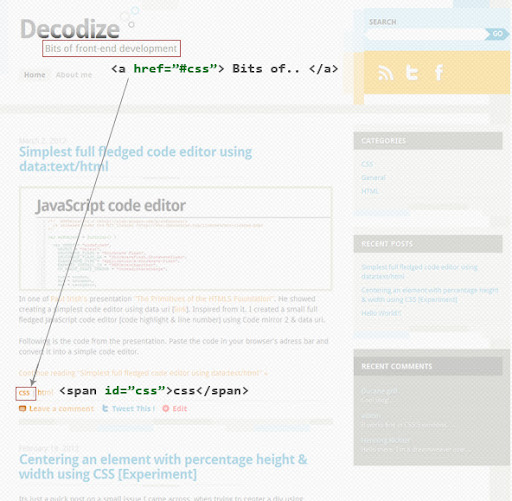
By using :target css3 selector we can select the element with same id & can apply style.

Using this we are going to create a tab, image gallery & notification only using CSS. Following codes are bare minimum requirement to build each modules. Please refer each demo’s code for more styling & animation.
Pure CSS tab
HTML
<ul class="tab">
<li><a href="#tab1">Tab1</a></li>
<li><a href="#tab2">Tab2</a></li>
<li><a href="#tab3">Tab3</a></li>
</ul>
<div id="tab1">Lorem ipsum dolor sit amet, consectetuer adipiscing elit, sed diam nonummy nibh euismod tincidunt ut laoreet dolore magna aliquam erat volutpat. Ut wisi enim ad minim veniam, quis nostrud exerci tation ullamcorper suscipit lobortis nisl ut aliquip</div>
<div id="tab2">Lorem ipsum dolor sit amet, consectetuer adipiscing elit, sed diam magna aliquam erat volutpat. Ut wisi enim ad minim veniam, quis nostrud exerci tation ullamcorper suscipit lobortis nisl ut aliquip</div>
<div id="tab3">Lorem ipsum dolor sit amet, consectetuer adipiscing elit, sed diam nonummy nibh euismod tincidunt ut laoreet dolore magna aliquam erat volutpat. Ut wisi enim ad minim veniam</div>
CSS
.tab{
overflow:hidden;
}
.tab li{
float:left;
padding:10px;
background:#c1c1c1;
}
div{
display:none;
}
div:target{
display:block;
}
This is the bare minimum code you need to create a CSS only tab. But we can take this further and can make a beautiful tab.
Pure CSS image gallery [lightbox]
HTML
<ul>
<li id="flower"><a href="#"><img class="alignnone size-medium wp-image-161" title="IMG_0251" src="http://www.decodize.com/wp-content/uploads/2012/03/IMG_0251-300x200.jpg" alt="" width="300" height="200"></a></li>
<li id="squirrel"><a href="#"><img class="alignnone size-medium wp-image-160" title="IMG_8806" src="http://www.decodize.com/wp-content/uploads/2012/03/IMG_8806-300x200.jpg" alt="" width="300" height="200"></a></li>
</ul>
*CSS**
li{
    position:absolute;
    background:rgba(0,0,0,.5);
    left:0;
    right:0;
    top:0;
    bottom:0;
    display:none;
}
li:target{
    display:inline-block;
    vertical-align:middle;
}
li img{
  position:absolute;
  top:50%;
  left:50%;
  margin-top:-100px;
  margin-left:-150px;
  display:block;
}
With few lines of HTML & CSS we created a modal window for image gallery. Next we will do some animations & beautification.
Pure CSS notification
HTML
CSS
#wrap {
position:absolute;
top:0;
opacity:0;
}
#wrap:target{
top:20%;
opacity:1;
}
The code displayed above is minimum required code to make a pure css notification. check out this full featured demo.
Browser support
Chrome [18 win & 17 mac] - Yes
Safari [5.1.x win & mac] - Yes
Firefox [11 win & 10.0.2 mac] - Yes
Opera [11.61 win & mac] - No
Internet Explorer - (IE9 & 10- Incomplete)