It is a quick post about site preloading. In one of my recent project there was a requirement for site preloading effect. When I googled I got some jQuery plugin. But some of them are bit heavy and loads the resources twice. I have used QueryLoader2. But I noticed increase in page load because of images are loading twice.
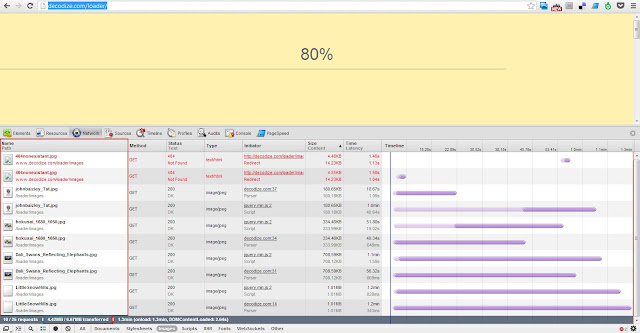
1.Using queryloader2 jquery plugin (Size 4.42 MB)
2.Normal page loading (Size 2.25 MB)
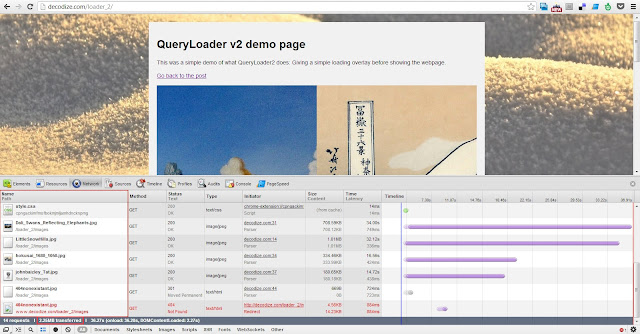
The images are requested by the parser and same resource is again requested by the script engine. Following methods can be used to create preloading effect.
Simple preloader
HTML
<body>
    <!-- Your HTML Code here -->
    <div id="loader"></div>
</body>
CSS
#loader{
    position:fixed;
    top:0;
    left:0;
    bottom:0;
    right:0;
    background:#fff url(../images/preloader.gif) 50%;
}
JS
window.load = function(){
    var loader = document.getElementById('loader');
    loader.style.display = 'none';
}
Percentage preloader
HTML
<script src="//cdnjs.cloudflare.com/ajax/libs/jquery/1.8.0/jquery.min.js">
<script src="preloader.js">
CSS
#loaderMask{
    text-align: center;
    padding-top: 20%;
}
#loaderMask span{
    font-size: 5em;

}
JS – preloader.js
$(document).ready(function () {
    "use strict"
    //indexOf support for IE8 and below.
    if (!Array.prototype.indexOf){
      Array.prototype.indexOf = function(elt /*, from*/){
        var len = this.length >>> 0;

        var from = Number(arguments[1]) || 0;
        from = (from < 0)
             ? Math.ceil(from)
             : Math.floor(from);
        if (from < 0)
          from += len;

        for (; from < len; from++){
          if (from in this &&
              this[from] === elt)
            return from;
        }
        return -1;
      };
    }

    //bgImg for holding background images in the page & img array for images present in the document(<img src="">).
    var bgImg = [], img = [], count=0, percentage = 0;

    //Creating loader holder.
    $('<div id="loaderMask"><span>0%</span></div>').css({
        position:"fixed",
        top:0,
        bottom:0,
        left:0,
        right:0,
        background:'#fff'
    }).appendTo('body');

    //Using jQuery filter method we parse all elemnts in the page and adds background image url & images src into respective arrays.
    $('*').filter(function() {

        var val = $(this).css('background-image').replace(/url\(/g,'').replace(/\)/,'').replace(/"/g,'');
        var imgVal = $(this).not('script').attr('src');

        //Getting urls of background images.
        if(val !== 'none' && !/linear-gradient/g.test(val) && bgImg.indexOf(val) === -1){
            bgImg.push(val)
        }

        //Getting src of images in the document.
        if(imgVal !== undefined && img.indexOf(imgVal) === -1){
            img.push(imgVal)
        }

    });

    //Merging both bg image array & img src array
    var imgArray = bgImg.concat(img);

    //Adding events for all the images in the array.
    $.each(imgArray, function(i,val){
        //Attaching load event
        $("<img />").attr("src", val).bind("load", function () {
            completeImageLoading();
        });

        //Attaching error event
        $("<img />").attr("src", val).bind("error", function () {
            imgError(this);
        });
    })

    //After each successful image load we will create percentage.
    function completeImageLoading(){
        count++;
        percentage = Math.floor(count / imgArray.length * 100);
        $('#loaderMask').html('<span>'+percentage + '%'+'</span>');

        //When percentage is 100 we will remove loader and display page.
        if(percentage === 100){
            $('#loaderMask').html('<span>100%</span>')
            $('#loaderMask').fadeOut(function(){
                $('#loaderMask').remove()
            })
        }
    }

    //Error handling - When image fails to load we will remove the mask & shows the page.
    function imgError (arg) {
        $('#loaderMask').html("Image failed to load.. Loader quitting..").delay(3000).fadeOut(1000, function(){
            $('#loaderMask').remove();
        })
    }

});
Demo Site preloader demo
Download Site preloader source